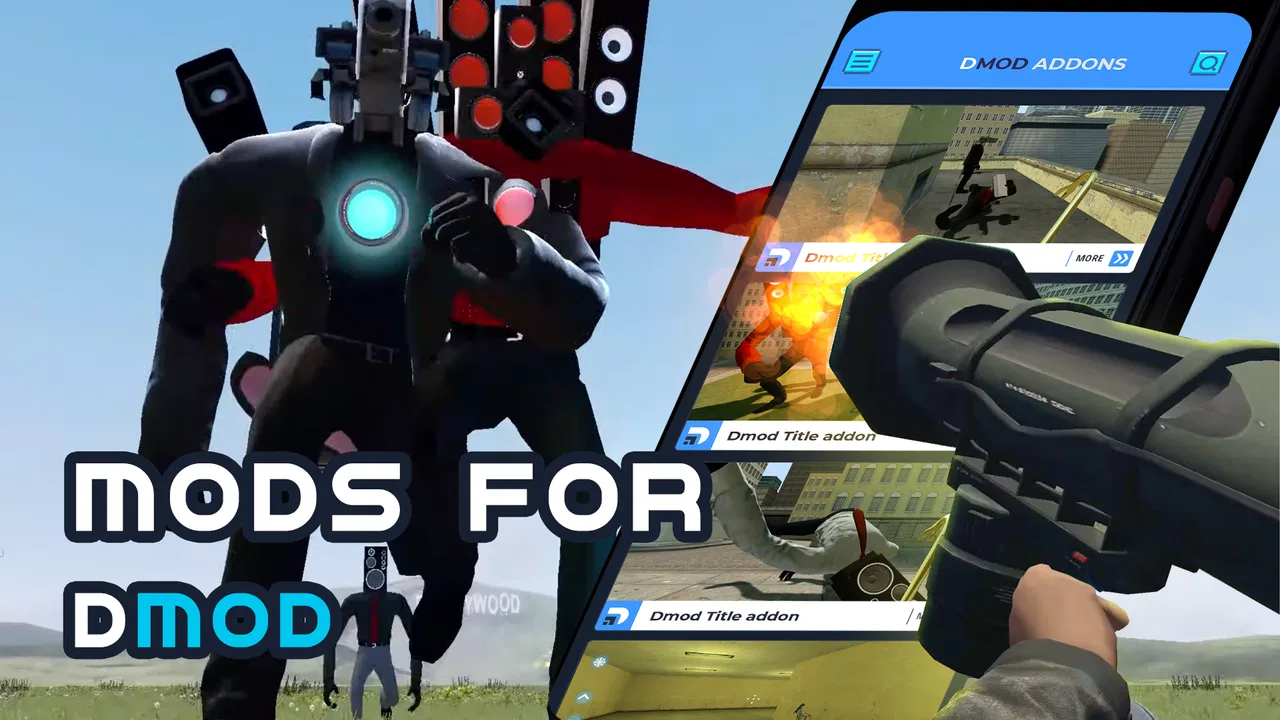
Mods for Dmod
- 3.2
- Rating
- 100.00K
- Installs
- Free
- Price

 Analysis by App-foxy
I approached Mods for Dmod as a small companion app for people who want to browse extra maps and modifications connected with Dmod, rather than as a replacement for the game itself. Its role is simple: collect downloadable ideas in one place and make it easier to decide what to try next. That narrow purpose is also its main strength. I did not have to search through unrelated game pages or sort through a broad modding platform to find Dmod material.
The app is listed in the Libraries & Demo category, is free to install, and comes from developer Dumitru Boico. It has reached over one hundred thousand installs and holds a 3.2 average from more than five hundred ratings, so there is clearly an audience for the concept, although the reception is mixed. It is rated for Everyone, which makes the intended audience broad, while the current version is 2.2 and supports devices running Android 6.0 or later.
My overall impression is that this is most useful when I already know I want to experiment with Dmod content. It is less convincing as a polished discovery service for someone who expects detailed explanations, carefully organized collections, or a fully guided installation experience. The difference matters, especially for users who need calm navigation, readable information, and predictable steps.
You May Also Like

 Blood Strike: 2.5 Anniversary
Blood Strike’s Loadouts Turn Every Drop Into a Tactical Gamble
A close look at Blood Strike’s custom loadouts: how fast access to signature weapons reshapes its battle royale rhythm, rewards preparation, and narrows the gap between fights.

 Pandora - Music & Podcasts
Pandora’s Music Is Easy to Start, but Harder to Recover
Pandora’s strength is its low-effort path from a seed to a station. Its weak spot is how much confidence it asks you to place in connection, setup, and quiet recovery.

 8 Ball Pool
 Is Built on Rivalries, Rematches, and Routine
A close look at the rivalries, rematches, shared routines, and unanswered safety questions that turn a quick pool match into a persistent mobile community.

 Samsung Music
’s Quiet Strength Is Playing What You Already Own
Its reach comes less from spectacle than from dependable access to a personal library. That simplicity is both the app’s strongest retention engine and its ceiling.

 AccuWeather: Weather Radar
AccuWeather Review: A Quick, Clear Forecast for Everyday Decisions
For everyday plans, the best forecast is the one you can understand quickly. AccuWeather makes rain timing, radar, and local conditions easy to act on, with a few trade-offs.

 Hill Climb Racing
Why Hill Climb Racing Still Turns Crashes Into One More Run
A tiny car, a bumpy hill and one more upgrade: Hill Climb Racing keeps resurfacing because its simple chaos makes every near-miss feel personal.
More From Our News Desk
View All News


How readable and manageable is the browsing experience?
I find that readable browsing is less about scanning quickly and more about making each choice with enough context. In this section, I’ll look at how a focused catalog can help users keep the task manageable, while noting the small-screen and attention demands that may still affect comfort. That leads naturally to a closer look at the physical and sensory conditions around using the app.
A focused catalog is easier to approach
The first thing I appreciate is the limited scope. Because the app is built around Dmod maps and mods, the basic purpose is understandable quickly. A user who opens it with a specific goal in mind can concentrate on finding something relevant instead of navigating a general-purpose game community. That focus can reduce mental effort for younger users, casual players, or anyone who dislikes crowded catalogs.
At the same time, a focused catalog only helps when each item is presented clearly. Before choosing a download, I would want to know what kind of content it is, what it changes, and whether it suits the way I play. This is where the experience can feel more dependent on the quality of each entry. A short or vague description creates extra work because I have to guess whether a mod is worth opening or installing.
For a reader with limited attention, the best approach is to treat the app as a browsing shelf rather than an encyclopedia. Open one item at a time, read the available description carefully, and avoid starting several downloads before checking what each one is meant to do. That simple workflow makes the catalog feel less overwhelming and reduces the chance of losing track of what I intended to test.
Navigation matters more than visual decoration
In an app like this, navigation does not need to be elaborate. It needs to be obvious. Clear separation between browsing, selecting, and downloading is more valuable than decorative screens. I find that users with reading difficulties, attention differences, or little experience with mods benefit from a predictable sequence: identify an item, inspect it, then decide whether to continue.
The app’s category placement also sets a useful expectation. It feels like a utility and content library, not a full social network or a game with complicated controls. That can make the first visit less intimidating. However, people who rely on strong visual hierarchy may still need to slow down if several entries look similar or if the important information is not immediately prominent.
A practical tip is to use the app in short sessions. Instead of browsing indefinitely, choose a small goal such as finding one map for the next Dmod session. This is not a limitation of the game content itself; it is a way to keep a compact catalog from becoming a stream of indistinguishable choices. It also makes it easier to remember which item you selected and whether it worked well for you.
Reading comfort depends on the device
Text-heavy mod descriptions can be tiring on a small phone, especially for people who need larger text or stronger contrast. I would not judge the app only by how it looks on one screen size. A user with low vision may find a larger display more comfortable, while someone using a compact phone may need to zoom mentally through dense information or rotate the device if the layout allows it.
Android’s own display and font controls are worth trying before deciding that the app is unusable. Increasing system text size can improve comfort, but it may also cause lines to wrap differently or make buttons feel more crowded. That trade-off is important: larger text helps reading, yet a cramped layout can make selection harder. I would test the setting with one or two entries before browsing the full collection.
People who process information slowly may also benefit from reading the title first, then the description, and only afterward looking for the download action. Separating those decisions avoids the common mistake of treating the first visible button as the obvious next step. For a simple mod library, this kind of deliberate order is more helpful than rushing through the screen.
Motor, sensory, and situational access
I’ll consider how deliberate tapping, a supported phone position, and separating browsing from play can make this kind of mod discovery easier in everyday use. I’ll also focus on how the selected content—not just the catalog—can shape a comfortable session, so the next section can address access needs beyond reading and navigation.
Small actions can still create friction
Browsing mods usually requires less physical precision than playing an action game, but that does not make motor access irrelevant. A person with tremors, reduced dexterity, or joint pain may find repeated tapping on small list items uncomfortable. The most useful habit is to avoid rapid repeated presses. Tap once, wait for the screen to respond, and confirm that the intended item opened before trying again.
This matters particularly around downloads. If the interface responds slowly, repeated taps can lead to uncertainty about whether an action happened once or several times. A slower, single-action workflow is safer and easier to understand. Users who operate Android with an alternative input method should also expect the experience to depend on how that method handles ordinary touch controls, since the app is fundamentally designed for mobile browsing.
For someone who cannot comfortably hold a phone for long, the app is better suited to preparation sessions than extended exploration. I would browse while the device is supported on a stand, shortlist a few items, and then return to Dmod later. That separates the physically demanding part of holding and tapping the phone from the more enjoyable part of playing.
Sensory load is likely to come from the content, not the catalog idea
The app’s purpose is relatively quiet compared with a game, but the material it points toward may lead to very different experiences inside Dmod. A map can be relaxing, confusing, visually intense, or demanding depending on its design. Since the catalog is a gateway to varied user-created content, I would not assume that every choice will suit a player who is sensitive to flashing visuals, sudden changes, or crowded scenes.
That is one reason descriptions are important. Even a basic explanation can help a user decide whether to try something immediately or save it for a more suitable setting. If I were choosing content for a child, a player who becomes overwhelmed easily, or someone using a small screen, I would select the least complicated-looking option first and test it briefly rather than downloading a large batch.
Audio sensitivity also changes the best use case. The catalog itself is not the same as the play session, so I would make accessibility decisions at both stages. Browse with the phone muted or at a comfortable level if that helps concentration, then adjust Dmod separately. Keeping those two environments distinct makes it easier to identify whether discomfort comes from browsing or from the selected content.
It works well in short, practical moments
A realistic everyday scenario would be preparing for a quick evening session. I might have ten minutes before meeting friends, open the app, look for one map that matches the mood, inspect its description, and stop once I have made a choice. That is where the app makes sense: it turns spare time into a focused selection task without requiring me to search across several unrelated sources.
It can also help when a group wants to try something different but does not agree on what to play. One person can browse while the others discuss the type of map they want. The app becomes a shared shortlist rather than a personal archive. This works best when everyone understands that the catalog is only part of the process and that the chosen content still needs to fit the group’s comfort level and available time.
For travel or unreliable connectivity, I would prepare before leaving rather than assume that browsing and downloading will be equally convenient everywhere. A weak connection can turn a quick selection into a frustrating wait, and a user with limited data may prefer to make decisions only when connected to a trusted network. That is not a reason to dismiss the app, but it does favor planned use over spontaneous searching.
Where it falls short for inclusive use
The main barrier is not the idea of collecting Dmod material; it is the uncertainty that can surround third-party-style content libraries. Users often need context before committing to a download. If an entry does not explain its purpose clearly, a person with limited technical confidence has to make a decision with incomplete guidance. Experienced players can experiment, while newcomers may feel that they are being asked to understand the modding culture before they have even started.
That gap affects more than beginners. A parent choosing content for a child may want a quick, plain-language explanation. A user with cognitive disabilities may need consistent naming and a clear indication of what happens next. Someone with limited storage or data may need to be selective. When those needs are not addressed directly, the app becomes more accessible to confident users than to people who need additional reassurance.
The mixed 3.2 average is a useful signal to keep expectations realistic. It suggests that the concept appeals to some users but does not deliver a uniformly smooth experience. I would therefore install it with a specific purpose, evaluate how clearly the first few entries are presented, and keep an alternative search method available if the catalog does not provide enough context.
Free access with a purchase caveat
The app is free to install, which lowers the barrier to trying it. That is helpful for users who want to test the browsing experience before committing money. There are also in-app purchases priced at $19.99 per item, so I would pay attention to any purchase prompt and avoid tapping through automatically, especially when a child is using the device or when a user prefers to keep all experimentation cost-free.
The price point makes the decision more serious than a casual free download. A user should be confident about what an item provides before paying for it. I would first explore the free portion, assess whether descriptions are understandable, and only then consider whether a paid item offers enough value for my particular use. This is also a good place to use Android purchase controls and family safeguards when appropriate.
Compared with a general mod website, a dedicated app can feel more convenient because it keeps Dmod-related material together. Compared with a highly maintained community hub, however, it may offer less surrounding discussion, troubleshooting, or peer explanation. The better choice depends on the user: people who want quick discovery may prefer this app, while those who need extensive documentation may be better served by a broader community resource.
My inclusive verdict after using it as a companion tool
I see Mods for Dmod as a practical starting point for Dmod players who want a concentrated place to explore maps and mods. Its strongest quality is its narrow purpose, and that focus can support users who prefer a smaller decision space. The Everyone rating and free entry also make it approachable for a broad audience, although the content selected through it still deserves individual judgment.
For accessibility, I would describe it as usable with a careful workflow rather than automatically effortless for everyone. Larger system text, a supported phone position, single deliberate taps, short browsing sessions, and cautious selection all make a difference. These are realistic adjustments for people with reading, motor, attention, or sensory needs, but they do not replace clear descriptions and predictable navigation inside the app.
I would recommend it to a Dmod player who already understands the basic idea of mods and wants a focused catalog to browse. I would be more hesitant to recommend it as a first step for someone who needs detailed technical guidance, extensive community help, or strong reassurance before downloading. In those situations, a broader, better-documented alternative may be more suitable even if it takes longer to search.
My final advice is to begin with one item, read everything available, and judge the app by how confidently it lets you make that first choice. If the information feels clear and the browsing rhythm suits you, it can become a convenient part of a Dmod routine. If every selection requires guesswork, the app’s compact design stops being an advantage. The best experience comes from treating it as a focused discovery shelf, not as a complete accessibility guide or a substitute for the game.
With its current version 2.2, developer Dumitru Boico has kept the product centered on a straightforward need: finding Dmod-related content in one place. That simplicity is appealing, but it also means the quality of the experience depends heavily on presentation, context, and the user’s willingness to explore carefully. For the right player, it is a useful free companion; for everyone else, the decision should come down to how much guidance and control they need before trying a new mod.
FAQs for Mods for Dmod
01What is Mods for Dmod and what does it offer?
Mods for Dmod is an app designed to enhance your gaming experience by providing a variety of mods for the popular Dmod game. It offers a wide range of customizations, including new maps, characters, and gameplay features. This app allows players to modify their game to suit personal preferences, adding new dimensions and challenges.
02Is Mods for Dmod safe to use on my device?
Yes, Mods for Dmod is safe when downloaded from reputable sources such as Google Play or the App Store. The app undergoes regular security checks to ensure no malware or harmful content. However, always ensure your device’s security settings are up-to-date before downloading any third-party modifications.
03Are all mods for Dmod free to download and use?
While Mods for Dmod offers a variety of free mods, some may require in-app purchases. These premium mods often provide exclusive features or content. Users should check individual mod descriptions to understand any associated costs and decide based on their interest and budget.
04Will using Mods for Dmod affect the performance of my game?
Using Mods for Dmod can affect game performance depending on the complexity and number of mods installed. Some mods may enhance gameplay, while others could cause lag or crashes, especially on older devices. It’s advisable to read user reviews and check compatibility before installation.
05Do I need technical knowledge to install mods using Mods for Dmod?
No, Mods for Dmod is designed with user-friendliness in mind. It provides step-by-step instructions for installing mods, making it accessible even to those with minimal technical knowledge. The app interface guides users through the process, ensuring a smooth and straightforward experience.
Pros
- Extensive library of mods available.
- User-friendly interface for easy navigation.
- Regular updates with new features.
- Supports both Android and iOS devices.
- Fast download speeds for mods.
Cons
- Some mods may contain bugs.
- Requires stable internet for downloads.
- Limited customer support options.
- Occasional ads can be intrusive.
- Not all mods are verified for safety.

Mods for Dmod
Gallery